PPQ587 Import Permit — Step-by-Step (Video Easy Tutorial)
In this video, I’ll walk you through the application process in an easy and clear way from creating your USDA eFile account to submitting the PPQ587 form online. By the end, you’ll know exactly how to apply, what documents you need, and how to avoid common mistakes that delay approval.
- Go to APHIS eFile
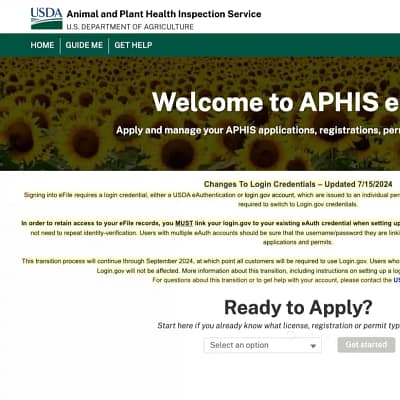
Open APHIS eFile in your browser. Click Login (or Create Account if you’re new) and complete USDA eAuthentication. You must be logged in to see the PPQ-587 application. (eFile) - Start a new PPQ-587 application
On the Ready to Apply area, choose PPQ-587 and click Get Started. (APHIS) - Applicant / Permittee Contacts
Confirm who is the Applicant (person submitting) and the Permittee (name that will be printed on the permit). Edit if needed, then Save & Continue. (APHIS) - Intended Use
Select the appropriate intended use for your imports (e.g., plants for planting, seeds, fruits/vegetables, etc.), then continue. (APHIS) - Select Articles (What you’ll import)
Add your articles: choose the country of origin, the scientific name (genus/species or family if allowed), and the plant part (e.g., plants, cuttings, seeds). Repeat to cover everything you plan to import under this permit. Tip for orchids: use Orchidaceae for the family when applicable. (APHIS) - Upload files (if requested)
Attach any supporting documents APHIS asks for (business info, clarifications, etc.), then continue. (APHIS) - Certify & Submit
Review each section for accuracy, check the certification boxes, and click Submit Application. You’ll get an email once APHIS processes it. (APHIS) - Find your permit & labels after approval
Go to My Activity → Outcomes & Labels to open your issued permit and any mailing/inspection labels generated by eFile (if applicable to your use). Download/print them for your shipments. (APHIS)
Quick Notes for Buyers (to mention in your video)
- Cost: PPQ permits (like PPQ-587) are free to apply; fees apply to certain other permits (e.g., PPQ-621 Protected Plants). (APHIS)
- Reuse & renewals: Your permit is valid until the expiration date shown on the permit; you can renew in eFile (renewal is available 90 days before or up to 30 days after expiry). (Environmental Health and Safety)
- Official training & help: USDA’s PPQ-587 user guide and training page provide screenshots and updates if the UI changes. (APHIS)